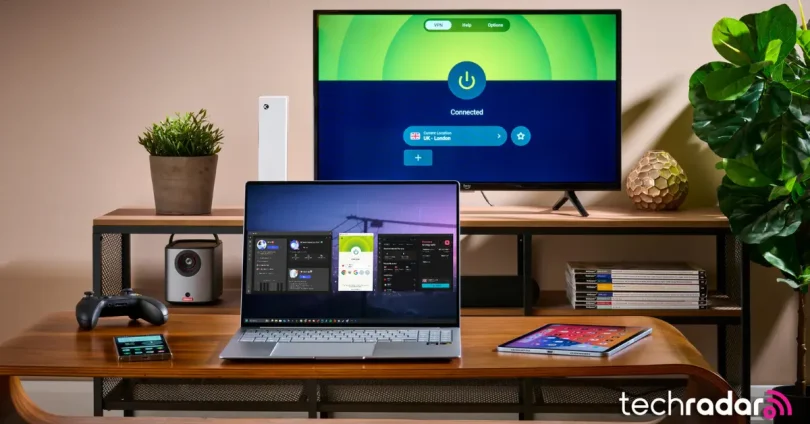

Introduction to VPNs and Online Privacy in 2025
In today’s digital age, online privacy has become one of the most pressing concerns for individuals and businesses alike. With an increasing number of cyber threats, surveillance, and data breaches, ensuring the privacy of your personal information online is more important than ever before. As we move further into 2025, the need for secure internet usage has intensified, making tools like Virtual Private Networks (VPNs) essential for maintaining privacy.
Why Online Privacy Matters in 2025
As more of our personal and professional lives shift online, so does the amount of sensitive data we generate. From financial details and health information to browsing habits and communication logs, our digital footprint is vast and vulnerable to exploitation. Whether it’s hackers trying to steal information, governments or corporations tracking your online activities, or public Wi-Fi networks posing security risks, the threats to your privacy are real and varied.
In 2025, online privacy is no longer just a luxury—it’s a necessity. With growing concerns about data surveillance and privacy laws, maintaining control over your personal information is vital for protecting your identity and digital safety.
What is a VPN and Why Does it Matter Today?
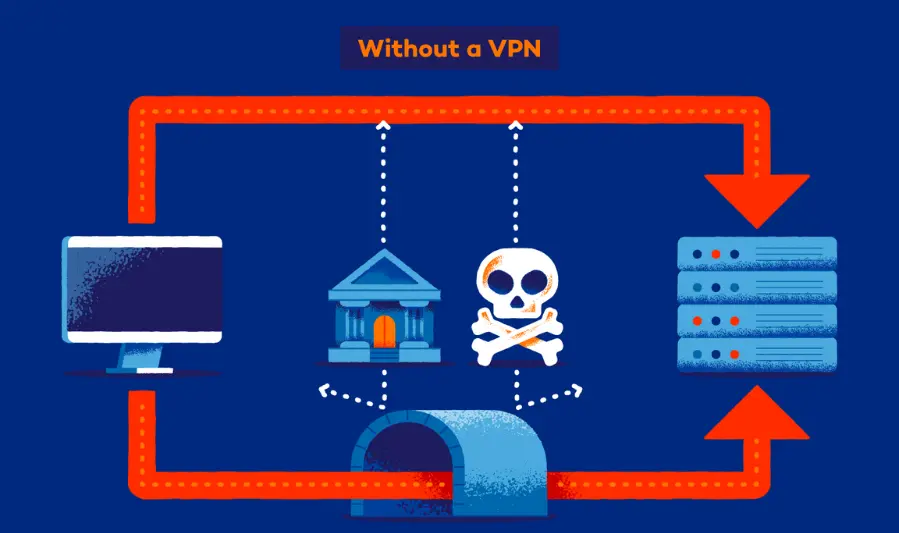
A Virtual Private Network (VPN) is a tool that encrypts your internet connection, creating a secure tunnel between your device and the websites or services you access. It does this by routing your internet traffic through a remote server located elsewhere, masking your IP address and making your online activities much harder to trace.
Why does it matter in 2025?
- Preventing Tracking and Surveillance: A VPN helps protect against tracking by governments, advertisers, and third-party organizations. It hides your browsing habits and location, ensuring you remain anonymous online.
- Securing Public Wi-Fi Usage: Public Wi-Fi networks are often unsecured, making it easier for hackers to intercept your data. A VPN encrypts your connection, making it safer to use public Wi-Fi in cafes, airports, or hotels.
- Bypassing Geo-restrictions and Censorship: Many services and websites restrict access based on your location. A VPN allows you to mask your location and access content from different countries or regions, bypassing geo-blocks and government censorship.
- Protecting Sensitive Data: If you frequently access sensitive information (such as online banking, work-related data, or personal documents), using a VPN can help safeguard your data from hackers and other malicious entities.
What This Post Will Cover:
This post will guide you through the importance of online privacy, the role of VPNs in maintaining it, and how VPNs can be your go-to tool in 2025 for secure internet browsing. We will discuss:
- The growing need for online privacy in today’s interconnected world.
- How VPNs work and their role in protecting your data and identity.
- The benefits of using a VPN, including preventing tracking, securing public Wi-Fi usage, and bypassing censorship.
- Choosing the best VPNs in 2025 based on performance, privacy features, and security.
- Best practices for using a VPN to ensure your privacy remains intact.
By the end of this guide, you’ll have a clearer understanding of how to safeguard your privacy and navigate the digital world with confidence using a VPN.
How Does a VPN Work?
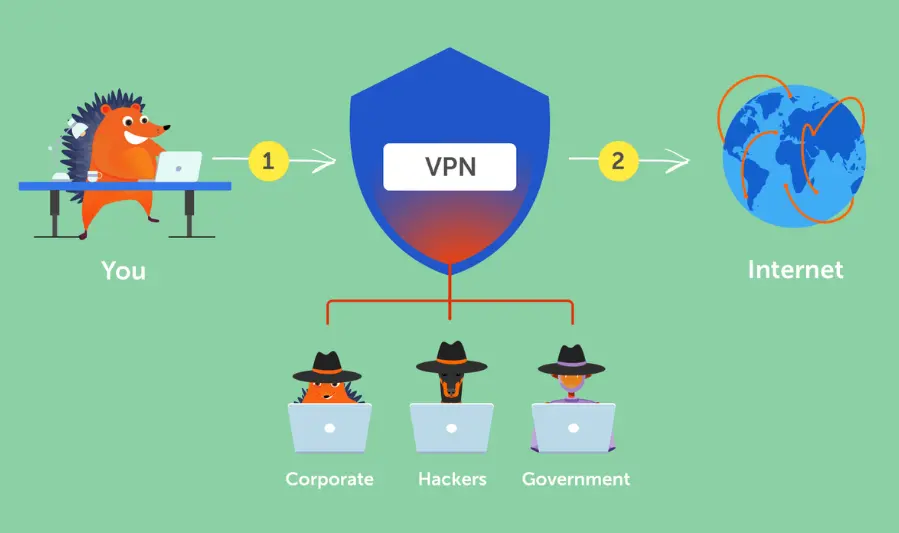
A Virtual Private Network (VPN) is designed to create a secure and private connection between your device and the internet. It achieves this through encryption and IP masking, both of which are fundamental to its operation. Let’s break down how it works:
1. VPN Technology Explained
A VPN works by routing your internet traffic through a secure server before it reaches its destination. This is done in the following steps:
- Data Encryption: When you connect to the internet through a VPN, your device encrypts the data being sent over your internet connection. This means that anyone trying to intercept your data (such as hackers or ISPs) will only see unreadable encrypted information.
- VPN Server: Your internet traffic is then routed through a VPN server located in a different location—often in a different country or region. This server acts as a middleman between your device and the websites you visit.
- Decoding at the Server: The VPN server receives your encrypted data, decrypts it, and sends it to the desired website or service. When the website responds, the process is reversed: the response is encrypted by the server, sent back to your device, and decrypted for you to view.
This secure “tunnel” ensures that your connection is private and safe from prying eyes.
2. Encryption and IP Masking
These two technologies are the core of VPN functionality, ensuring both privacy and security:
- Encryption:
- What It Is: Encryption is the process of transforming readable data into an unreadable format. For example, instead of sending your data as plain text (like a message or login credentials), encryption turns it into a string of random characters.
- Why It Matters: This means that if anyone intercepts your data during transmission (like a hacker on a public Wi-Fi network), they will only see gibberish instead of your sensitive information, keeping it safe.
- Types of Encryption: The best VPNs use AES-256 encryption (Advanced Encryption Standard with a 256-bit key), which is incredibly strong and virtually impossible to break, even by sophisticated attackers.
- IP Masking:
- What It Is: When you connect to the internet normally, your device is assigned a unique IP address that reveals your physical location and identity. A VPN masks your real IP address by assigning you an IP address from the VPN server you’re connected to.
- Why It Matters: By masking your IP address, a VPN makes it look like you’re browsing from the location of the VPN server, rather than your actual location. This prevents websites, ISPs, and governments from tracking your real IP address and, by extension, your online activities.
3. Benefits of Using a VPN for Security and Privacy
Using a VPN comes with several significant advantages, especially in terms of security and privacy:
- Enhanced Privacy and Anonymity:
- Mask Your Identity: By hiding your IP address, a VPN prevents websites and online services from tracking your browsing habits, personal information, and location.
- Bypass Geo-Restrictions: Many websites and streaming platforms restrict content based on your geographic location. With a VPN, you can virtually “move” to a different country by connecting to a server in that location, allowing you to access region-restricted content.
- Anonymity for Browsing: Since your real IP is hidden, and all your traffic is encrypted, your browsing habits remain anonymous from ISPs, advertisers, and anyone else trying to monitor your activities online.
- Increased Security:
- Protection from Hackers: On public Wi-Fi networks (like those in cafes, airports, or hotels), data is often unprotected and easy for hackers to intercept. With a VPN, your connection is encrypted, meaning even if someone tries to hack into the network, they can’t access your data.
- Prevent Data Throttling: Some ISPs may intentionally slow down your connection speed when you’re streaming video, gaming, or torrenting. By using a VPN, you can prevent throttling and maintain a fast and stable connection.
- Protection Against Malicious Sites: Many VPNs offer features that block or warn you about malicious websites and phishing attacks, adding an extra layer of protection against online threats.
- Secure Online Transactions:
- If you often engage in online banking, shopping, or access sensitive accounts, using a VPN ensures that your financial data and personal details are protected from cybercriminals attempting to intercept your communication.
- Bypass Censorship:
- In countries with heavy internet censorship (such as China or Russia), VPNs are a vital tool for accessing blocked websites and social media platforms. A VPN allows users to bypass government-imposed internet filters and access the open internet freely.
In Summary:
- Encryption ensures that your data remains private and unreadable to anyone intercepting it, while IP masking hides your real location and browsing activities, providing anonymity.
- The benefits of using a VPN go beyond simple privacy protection. It secures your connection, prevents monitoring by third parties (like ISPs), allows access to restricted content, and provides enhanced protection against cyberattacks.
A VPN is not just a tool for accessing restricted content; it is an essential piece of cybersecurity that ensures privacy and security in an increasingly interconnected world. Whether you’re browsing the web, shopping online, or accessing public Wi-Fi, a VPN is a must-have to safeguard your personal information.
you may also like to read these posts:
Ultimate Guide to the Best Webcams for Streaming in 2025
Boost Performance: Laptop Stands & Cooling Pads
Affordable Cloud Storage Solutions for Everyone
Ultimate Guide to the Best VPN Services of 2025
Key Features to Look for in a VPN Service
When choosing a VPN, it’s important to evaluate the specific features that will offer you the best protection, performance, and user experience. The right VPN should provide strong security, privacy guarantees, and reliable service. Here are the key features to consider before signing up for a VPN service:
1. Strong Encryption Standards (AES-256)
- What It Is: Encryption is the process of turning your data into unreadable code to protect it from hackers or unauthorized access. AES-256 (Advanced Encryption Standard with a 256-bit key) is widely regarded as one of the most secure encryption methods available.
- Why It Matters: AES-256 encryption ensures that your data is protected from even the most sophisticated cyber threats. This standard is used by government agencies, military organizations, and financial institutions to safeguard sensitive information.
- What to Look For: Always opt for a VPN that uses AES-256 encryption. This ensures your data will be secure both while it’s transmitted over the internet and when stored on the VPN provider’s servers.
2. No-Logs Policy and Privacy Guarantees
- What It Is: A no-logs policy means that the VPN provider does not track or store any records of your online activity. This includes browsing history, connection times, IP addresses, and more.
- Why It Matters: A no-logs policy is crucial for maintaining your privacy. If a VPN provider keeps logs of your activities, they could potentially hand that data over to authorities or third parties if subpoenaed, or in the event of a security breach.
- What to Look For: Ensure that the VPN provider clearly states a no-logs policy and offers transparency through third-party audits. Providers like ExpressVPN and NordVPN have undergone independent audits to verify their no-logs claims.
3. Kill Switch Functionality
- What It Is: A kill switch is a feature that automatically disconnects your internet connection if the VPN connection drops unexpectedly. This ensures that your true IP address and personal data are never exposed in case of a disconnection.
- Why It Matters: Without a kill switch, if your VPN connection drops, your device will revert to your regular internet connection, which exposes your data and IP address. A kill switch prevents this by stopping all internet traffic until the VPN connection is restored.
- What to Look For: Make sure the VPN has an active kill switch feature, especially if you rely on the VPN for secure online activities like banking or shopping.
4. DNS Leak Protection
- What It Is: DNS (Domain Name System) leak protection ensures that your DNS requests are routed through the VPN server and not directly to your ISP’s DNS servers. A DNS leak can reveal the websites you visit and expose your browsing habits.
- Why It Matters: DNS leaks can compromise your privacy, revealing your online activity even if you are using a VPN. DNS leak protection ensures that all your traffic, including DNS requests, is routed through the secure tunnel established by the VPN.
- What to Look For: Choose a VPN that offers DNS leak protection as a standard feature to prevent any accidental data leaks.
5. Number and Location of Servers
- What It Is: The number of servers and their locations determine how many different geographic regions you can connect to and the quality of your connection.
- Why It Matters: A larger server network increases your options for accessing content from various regions, and it can also improve your connection speed and server load by providing multiple server options in each country.
- What to Look For: Look for a VPN with global server coverage and servers in countries you’re interested in accessing content from. For example, ExpressVPN has servers in over 90 countries, which is ideal for bypassing regional restrictions.
6. Speed and Bandwidth Limits
- What It Is: VPNs can affect your internet speed because they route your traffic through remote servers. Some VPNs also impose bandwidth limits or throttle speeds depending on the plan you’re on.
- Why It Matters: Speed is essential for activities like streaming, gaming, or large file downloads. A high-speed VPN with no bandwidth caps ensures that your connection remains fast and uninterrupted.
- What to Look For: Choose a VPN that offers high-speed servers and has a reputation for maintaining performance even with encryption active. Check if they provide unlimited bandwidth without throttling, especially for streaming services like Netflix or for torrenting.
7. Multi-Device Support
- What It Is: Multi-device support allows you to use the VPN on multiple devices simultaneously (e.g., laptop, smartphone, tablet, and more).
- Why It Matters: In 2025, you likely use a variety of devices, from desktops to smartphones to smart TVs. A VPN that supports multiple devices ensures that you can protect all of your devices at once without needing separate subscriptions.
- What to Look For: Look for a VPN that supports multiple devices (usually 5-10 devices per account). Many leading VPNs offer dedicated apps for Windows, macOS, Android, iOS, and sometimes Linux, routers, and even smart TVs.
8. Customer Support Availability
- What It Is: Reliable customer support helps resolve any issues you may face while using the VPN service. Live chat, email support, or a help center can make troubleshooting easier.
- Why It Matters: When you’re facing technical difficulties or need assistance setting up your VPN, responsive customer support can make the difference between a frustrating experience and a smooth one.
- What to Look For: Choose a VPN with 24/7 customer support, especially live chat support, to quickly address problems. A solid help center with tutorials and FAQs is also helpful for self-troubleshooting.
Summary of Key Features:
- Strong Encryption Standards: Ensure AES-256 encryption for top-tier security.
- No-Logs Policy: Prioritize VPNs that do not track your online activity.
- Kill Switch: Automatically stops internet traffic if your VPN connection fails.
- DNS Leak Protection: Prevents DNS requests from leaking and exposing your activity.
- Number and Location of Servers: A diverse and global network of servers provides more access and better speeds.
- Speed and Bandwidth Limits: Choose a VPN with no throttling and high-speed servers for optimal performance.
- Multi-Device Support: Protect multiple devices at once with a single subscription.
- Customer Support: Ensure 24/7 support to quickly resolve any issues.
These features combine to give you a secure, private, and high-performance VPN experience. Choosing the right VPN that offers all or most of these features ensures that your online activity remains safe, secure, and private in 2025.
Top VPN Services for 2025: Detailed Reviews
When it comes to selecting a VPN service, several providers offer top-notch features for privacy, security, and performance. Below, we’ll break down five of the best VPN services in 2025, highlighting their pros, cons, and key features to help you make an informed decision.
1. ExpressVPN
Overview:
ExpressVPN is one of the most well-known and highly-rated VPNs, offering fast speeds, solid encryption, and a large server network. It’s a great option for both beginners and experienced users who want a seamless, secure experience.
Key Features:
- Encryption: AES-256 encryption with perfect forward secrecy.
- Servers: 94 countries, with over 3,000 servers.
- Speed: Excellent speed, ideal for streaming, gaming, and downloading.
- Streaming Support: Unblocks Netflix, Hulu, BBC iPlayer, and more.
- Privacy: Strict no-logs policy.
- Device Support: Supports a wide range of devices including smartphones, PCs, smart TVs, and routers.
Pros:
- Fast connection speeds, even with encryption enabled.
- No-logs policy, verified through independent audits.
- Great for streaming and unblocking geo-restricted content.
- Easy-to-use apps for all major platforms.
- 24/7 customer support via live chat.
Cons:
- Slightly more expensive than some other VPNs.
- Limited simultaneous connections (5 devices at once).
- Lack of advanced settings for experienced users who prefer customization.
2. NordVPN
Overview:
NordVPN is a powerful and secure VPN service, well-known for its advanced security features, robust privacy protection, and excellent server coverage. It’s an ideal choice for users who need maximum privacy and speed.
Key Features:
- Encryption: AES-256 encryption, with options for Double VPN (Double encryption).
- Servers: 5,000+ servers in 60+ countries.
- Speed: Fast, reliable performance for high-bandwidth activities like streaming and torrenting.
- Privacy: Strict no-logs policy, independently audited.
- Special Features: CyberSec (ad blocker), Onion over VPN, and Double VPN for added security.
- Device Support: Compatible with all major devices, including routers.
Pros:
- Large server network and diverse locations.
- Top-notch security features like Double VPN and CyberSec.
- Excellent streaming support (unblocks Netflix, BBC iPlayer, Amazon Prime Video).
- 6 simultaneous connections allowed.
- Affordable pricing for long-term plans.
Cons:
- The desktop app can be slightly slower to connect.
- Some servers may experience variable speeds.
- Short-term plans (monthly) are more expensive than annual plans.
3. CyberGhost
Overview:
CyberGhost is known for its user-friendly interface and high-level privacy features, making it a solid choice for newcomers to VPNs and those looking for easy setup. It’s an affordable VPN with great server options and robust streaming capabilities.
Key Features:
- Encryption: AES-256 encryption with SHA-256 hash authentication.
- Servers: Over 7,000 servers in 90+ countries.
- Speed: Good performance for everyday use, streaming, and browsing.
- Privacy: Strict no-logs policy.
- Special Features: Dedicated servers for streaming and torrenting.
- Device Support: Works with Windows, macOS, Android, iOS, and more.
Pros:
- User-friendly interface—easy for beginners.
- Huge server network in many countries.
- Great streaming support—unblocks major streaming services.
- Affordable pricing, especially for long-term subscriptions.
- Up to 7 simultaneous connections.
Cons:
- Speeds can be inconsistent on some servers.
- Limited customization options for advanced users.
- Some minor privacy concerns over past ownership, though no logs are kept.
4. Surfshark
Overview:
Surfshark is a feature-rich, budget-friendly VPN that provides great security and unlimited device connections. It’s an ideal choice for families or individuals who want to protect multiple devices without breaking the bank.
Key Features:
- Encryption: AES-256 encryption with IKEv2/IPsec and OpenVPN protocols.
- Servers: 3,200+ servers in 100+ countries.
- Speed: Fast speeds, optimized for streaming, gaming, and large downloads.
- Privacy: No-logs policy and private DNS.
- Special Features: CleanWeb (ad-blocking), MultiHop (double VPN), and a kill switch.
- Device Support: Works on all platforms, including Amazon Fire TV, Roku, and game consoles.
Pros:
- Unlimited device connections—great for families or households with many devices.
- Affordable plans with long-term options.
- No logs policy with excellent privacy features.
- Unblocks streaming services like Netflix, BBC iPlayer, and Disney+.
- CleanWeb feature blocks ads and trackers.
Cons:
- Some server locations can be slower than others.
- Occasional app glitches, but they’re usually fixed quickly.
- Relatively new compared to older, more established VPN providers.
5. Private Internet Access (PIA)
Overview:
Private Internet Access (PIA) is known for its reliable service, strong encryption, and affordable pricing. While it might not offer the same number of advanced features as other services, it’s still a solid choice for those prioritizing security and privacy.
Key Features:
- Encryption: AES-256 encryption with OpenVPN and WireGuard protocols.
- Servers: 29,000+ servers in 77 countries.
- Speed: Fast enough for general use, streaming, and torrenting.
- Privacy: Strict no-logs policy.
- Device Support: Compatible with Windows, macOS, iOS, Android, Linux, and routers.
Pros:
- Huge server network for optimal location selection.
- Affordable with a variety of payment options.
- Strong encryption and security features, including split tunneling and port forwarding.
- Supports WireGuard for fast and secure connections.
- Great for torrenting and P2P file sharing.
Cons:
- No built-in ad blocker (unlike some competitors).
- Can be slow on certain servers, particularly in remote locations.
- The user interface is a bit basic compared to others.
- 5 simultaneous connections, fewer than some rivals.
Summary of Pros and Cons
| VPN Provider | Pros | Cons |
|---|---|---|
| ExpressVPN | Fast speeds, secure encryption, great for streaming, 24/7 support | Higher pricing, limited simultaneous connections (5) |
| NordVPN | Strong security, Double VPN, large server network, good for streaming | Desktop app can be slow to connect, short-term plans more expensive |
| CyberGhost | User-friendly, huge server network, good for streaming, affordable | Inconsistent speeds, limited customization options |
| Surfshark | Unlimited devices, great value, strong privacy features | Some slower servers, occasional app glitches |
| PIA (Private Internet Access) | Huge server network, affordable, strong security features | Slower on remote servers, basic user interface, fewer connections |
Conclusion:
- Best for Speed & Performance: ExpressVPN and NordVPN.
- Best Budget Option: Surfshark and CyberGhost.
- Best for Advanced Users: NordVPN with its extra features like Double VPN.
- Best for Torrenting & P2P: Private Internet Access (PIA).
Each of these VPN providers offers a unique set of strengths, so the best VPN for you will depend on your specific needs, whether you prioritize speed, security, streaming, or budget.
VPN Use Cases: How a VPN Can Enhance Your Online Experience
VPNs are powerful tools for protecting your privacy and security, but their use cases go far beyond just encryption. Here are some of the top use cases for a VPN in 2025, each of which can greatly benefit your online activities.
1. Streaming Geo-Restricted Content
How It Works:
- Many streaming services like Netflix, Hulu, BBC iPlayer, and Disney+ restrict content based on your geographical location. By connecting to a VPN server in a different country, you can spoof your location and access content that is otherwise unavailable in your region.
Why Use a VPN for Streaming?
- Unblock Netflix Libraries: Watch content available in the U.S., U.K., or other regions.
- Bypass Geo-blocks: Access international content on platforms like Amazon Prime Video, BBC iPlayer, and HBO Max.
- Privacy & Security: Protect your browsing history and data from third-party tracking.
Best VPNs for Streaming:
- ExpressVPN: Known for reliably unblocking streaming platforms and providing high-speed connections.
- Surfshark: Great for families with its unlimited device support and streaming capabilities.
2. Secure Browsing on Public Wi-Fi
How It Works:
- Public Wi-Fi networks, like those in cafes, airports, or hotels, are often unsecured, making them prime targets for hackers. A VPN encrypts your internet traffic, preventing attackers from accessing your sensitive data (like passwords and credit card info) even on these untrusted networks.
Why Use a VPN on Public Wi-Fi?
- Protect Sensitive Information: Prevent hackers from intercepting your data (especially important for online banking, shopping, or entering personal credentials).
- Avoid Man-in-the-Middle Attacks: Encrypting your traffic ensures that attackers can’t alter or read the data exchanged between you and the websites you visit.
- Prevent Tracking: Keep your browsing habits private, even when using free public networks.
Best VPNs for Public Wi-Fi Security:
- NordVPN: Known for its excellent security features like DNS leak protection and a kill switch.
- CyberGhost: Offers specialized servers for secure browsing and ad-blocking.
3. Torrenting and P2P Sharing
How It Works:
- VPNs are commonly used for torrenting and P2P file sharing, which can expose your IP address to others. A VPN hides your IP, encrypts your traffic, and helps prevent ISP throttling or legal notices.
Why Use a VPN for Torrenting?
- Privacy: Keeps your IP address hidden from other users and potential legal action.
- Avoid Throttling: Many ISPs slow down your connection if they detect P2P activity. A VPN helps bypass this limitation.
- Access Torrent Sites: Some websites may be blocked in your country. A VPN can help you access these sites without detection.
Best VPNs for Torrenting:
- Private Internet Access (PIA): Offers high-speed servers for torrenting and P2P sharing, with strong encryption.
- Surfshark: Ideal for unlimited connections, allowing multiple devices to download simultaneously.
4. Bypassing Government Censorship
How It Works:
- In countries with strict internet censorship, VPNs are used to access blocked websites and services. By connecting to a VPN server outside the restrictive region, users can freely browse the web without interference from government filters.
Why Use a VPN for Bypassing Censorship?
- Access Blocked Websites: Access news, social media platforms, or other content that may be censored in your country.
- Maintain Anonymity: By masking your IP address, a VPN helps you remain anonymous while accessing restricted sites.
- Evade Surveillance: In regions with heavy government surveillance (e.g., China, Russia), a VPN ensures that your online activities remain private.
Best VPNs for Bypassing Censorship:
- ExpressVPN: Consistently works in censored countries and provides robust privacy protection.
- NordVPN: Provides obfuscated servers to help users bypass firewalls and censorship in countries with heavy internet restrictions.
5. Business and Remote Work Security
How It Works:
- For businesses, a VPN ensures that employees working remotely can securely connect to company networks, access internal resources, and keep sensitive data safe from cyber threats. It’s essential for maintaining business continuity and data protection in a remote work environment.
Why Use a VPN for Business Security?
- Remote Access to Internal Systems: Employees can access company servers and internal files securely, no matter where they are.
- Prevent Data Breaches: Encrypt sensitive company data and transactions, reducing the risk of unauthorized access or leaks.
- Bypass Geoblocks: Employees traveling abroad can still access company tools or websites that are restricted to certain regions.
Best VPNs for Business and Remote Work:
- NordVPN Teams: A specialized VPN for businesses that need to secure remote work and internal resources.
- ExpressVPN: Offers dedicated apps for businesses with an emphasis on performance and security.
Summary of VPN Use Cases
| Use Case | Why It Matters | Best VPNs for the Job |
|---|---|---|
| Streaming Geo-Restricted Content | Access global content libraries and protect privacy. | ExpressVPN, Surfshark |
| Secure Browsing on Public Wi-Fi | Protect sensitive data from hackers and man-in-the-middle attacks. | NordVPN, CyberGhost |
| Torrenting and P2P Sharing | Maintain privacy and avoid throttling or legal issues. | Private Internet Access (PIA), Surfshark |
| Bypassing Government Censorship | Access blocked websites and remain anonymous in censored regions. | ExpressVPN, NordVPN |
| Business and Remote Work Security | Secure remote work and protect business data from cyber threats. | NordVPN Teams, ExpressVPN |
Conclusion:
Whether you’re streaming media from another country, securing sensitive data on public Wi-Fi, torrenting, or bypassing censorship, a VPN offers essential protection and privacy in today’s digital landscape.
- For streaming, go for ExpressVPN or Surfshark.
- For secure browsing on public Wi-Fi, choose NordVPN or CyberGhost.
- For torrenting, consider PIA or Surfshark.
- For evading censorship, ExpressVPN and NordVPN shine.
- For remote work, NordVPN Teams and ExpressVPN offer business-class security.
Pricing and Subscription Plans for VPNs
When choosing a VPN, it’s crucial to consider not only the features and performance but also the pricing models and subscription options. Here’s an overview of common VPN pricing structures, as well as the pros and cons of free vs. paid VPNs, and the differences between long-term and monthly subscriptions.
Common Pricing Models for VPN Services
VPN providers generally offer a range of pricing plans depending on the subscription duration and the features provided. Below are the most common pricing models you’ll encounter:
- Monthly Subscriptions:
- This is the most flexible option, where you pay for a one-month period at a time.
- Typically, this is the most expensive option, as it offers the least commitment.
- Yearly Subscriptions:
- This plan is more cost-effective compared to monthly subscriptions, where you pay for the entire year upfront.
- Providers often offer discounted pricing for annual plans.
- Multi-Year Subscriptions:
- Often the best value, multi-year plans (e.g., 2- or 3-year plans) offer significant discounts compared to paying monthly.
- This is a great choice if you’re committed to using the VPN long-term.
- Family/Device Plans:
- Some VPNs offer pricing for multiple users or devices. This is ideal if you want to share the service with family members or need VPN protection across various devices.
- It’s typically more cost-effective than purchasing separate subscriptions.
Free VPNs vs. Paid VPNs: Pros and Cons
Free VPNs
While free VPNs may seem like an appealing option, they often come with limitations, especially when it comes to privacy, security, and performance.
Pros of Free VPNs:
- No Cost: The most obvious benefit is that you don’t have to pay for the service.
- Good for Light Use: If you only need to use a VPN occasionally (for example, to change your location or bypass light censorship), a free VPN might suffice.
Cons of Free VPNs:
- Limited Features and Servers: Free VPNs typically have a restricted number of servers and bandwidth limitations. This can lead to slow speeds and reduced reliability.
- Weaker Security: Many free VPNs have weaker encryption or may log and sell your data to third parties. Free services often make money by selling user data.
- Increased Risk of Malware: Some free VPN providers include malware in their apps, putting your device and data at risk.
- Limited Support: Free VPN services generally offer poor or non-existent customer support.
Paid VPNs
Paid VPN services are more reliable, secure, and feature-rich, offering much better value for money.
Pros of Paid VPNs:
- Better Security & Encryption: Paid VPNs often use industry-leading encryption standards (e.g., AES-256) to protect your data.
- No Logs Policy: Most reputable paid VPNs have no-logs policies, ensuring your browsing history isn’t tracked.
- Fast Speeds and Unrestricted Access: Paid VPNs usually offer unlimited bandwidth, fast speeds, and a wide range of server locations, improving streaming and gaming experiences.
- Customer Support: Paid services typically provide 24/7 support with live chat or email options.
- Additional Features: Paid VPNs come with extra features like ad-blocking, kill switches, split tunneling, and multi-device support.
Cons of Paid VPNs:
- Monthly/Yearly Costs: The main drawback of paid VPNs is the subscription fee, which can range from $3 to $15 per month depending on the provider and plan.
- Commitment: Some services require you to commit to long-term plans, which may not suit those looking for short-term use.
Long-Term vs. Monthly Subscriptions:
When deciding between long-term (annual or multi-year) and monthly VPN subscriptions, each has its benefits and potential drawbacks.
Monthly Subscriptions:
Pros:
- Flexibility: Ideal for users who need a VPN for a short period (e.g., a month-long travel or project).
- No Long-Term Commitment: You aren’t locked into a contract, so you can cancel anytime.
- Trial Period: If you’re just testing the service, a monthly plan allows you to experiment without a long-term commitment.
Cons:
- Higher Cost: Monthly subscriptions tend to be significantly more expensive than annual or multi-year plans. You’ll typically pay anywhere from $10 to $15 per month.
- Limited Discounts: You won’t benefit from the large discounts that often come with long-term subscriptions.
Long-Term Subscriptions (Annual or Multi-Year):
Pros:
- Cost Savings: Multi-year subscriptions generally offer substantial discounts (e.g., 60%–80% off). A VPN service might cost $3 to $6 per month for long-term plans, compared to $10 or more for a monthly plan.
- Security for the Long-Term: If you’re committed to securing your data over the long run, a multi-year plan provides ongoing protection at a reasonable price.
- Free Trial Periods: Some providers offer money-back guarantees (e.g., 30-day or 45-day), allowing you to test the service risk-free before committing.
Cons:
- Upfront Payment: You’ll be required to pay for the entire year or multi-year period upfront, which can be a larger initial cost.
- Commitment: If your needs change, you’re locked into a plan for the specified term (though most providers offer money-back guarantees).
- Auto-Renewal Concerns: Many long-term plans are automatically renewed, which can be an issue if you forget to cancel.
Example Pricing for Top VPNs:
| VPN Provider | Monthly Subscription | Annual Subscription | 3-Year Plan |
|---|---|---|---|
| ExpressVPN | $12.95/month | $99.95/year ($8.32/month) | $59.95/3 years ($4.99/month) |
| NordVPN | $11.95/month | $59.00/year ($4.92/month) | $89.00/2 years ($3.71/month) |
| Surfshark | $12.95/month | $59.76/year ($4.98/month) | $59.76/2 years ($2.49/month) |
| CyberGhost | $12.99/month | $47.75/year ($3.98/month) | $99.75/3 years ($2.77/month) |
| Private Internet Access | $9.95/month | $39.95/year ($3.33/month) | $79.00/3 years ($2.19/month) |
Conclusion: Which Plan Should You Choose?
- For Short-Term Use: If you only need a VPN for a short period, such as for a trip or specific project, go for a monthly subscription. Keep in mind that it will be pricier.
- For Long-Term Use: If you need a VPN for the foreseeable future, especially for security or business purposes, annual or multi-year plans offer significant savings and are often the better deal.
- Free VPNs: While free VPNs can work for occasional, non-sensitive activities, they come with risks and limitations. For full protection and reliability, a paid VPN is highly recommended.
How to Set Up and Use a VPN: A Step-by-Step Guide
Setting up a VPN is generally straightforward, but the exact steps can vary slightly depending on the provider. Below is a generalized guide to help you get started with most VPN services, along with tips for optimization and solutions to common problems.
Step-by-Step Setup Guide
1. Choose a VPN Provider
- Select a VPN provider that suits your needs. Popular options include ExpressVPN, NordVPN, Surfshark, and CyberGhost.
- Visit the provider’s website and sign up for the plan that fits your preferences (monthly, annual, or multi-year).
- Ensure the VPN you choose offers apps for your device (Windows, macOS, Android, iOS, Linux, etc.).
2. Download and Install the VPN Application
- Download the VPN app from the official website or the relevant app store (Google Play, Apple App Store, etc.).
- For Windows or macOS, visit the provider’s website and download the desktop application.
- For Android or iOS, go to the Google Play Store or Apple App Store and search for the VPN provider.
- Install the app on your device by following the on-screen instructions.
3. Log In to Your VPN Account
- Open the VPN application.
- Log in using the credentials you created during sign-up.
- Some services may require you to activate your account by clicking a link sent to your email.
4. Choose a VPN Server
- Most VPN apps will automatically connect you to a recommended server based on your location or the best available option.
- If you want to change your virtual location, select a server in a different country or region. For example:
- For streaming: Choose a server in a country with access to the content you want to watch (e.g., a U.S. server for U.S. Netflix).
- For privacy: You might want to select a server in a privacy-friendly country, such as Switzerland.
5. Connect to the VPN
- After selecting a server, click the Connect button in the app. The app will establish a secure connection between your device and the VPN server.
- Once connected, your IP address will be masked, and your internet traffic will be encrypted.
- You’ll usually see a “Connected” status in the app, indicating that the VPN is active.
6. Use the Internet Safely
- After the connection is established, you can browse the internet, stream content, or use apps with the privacy and security of the VPN in place.
- If you’re using the VPN to access restricted content or bypass geo-blocks, now is the time to enjoy uninterrupted streaming or browsing.
Tips for Optimizing VPN Performance
- Choose the Right Server Location:
- If speed is important, choose a server close to your physical location.
- For unblocking content, choose a server in the country where the content is available (e.g., a U.S. server for U.S. Netflix).
- Use the Fastest Protocol:
- Most VPN apps offer multiple protocols (e.g., OpenVPN, IKEv2, WireGuard). For speed and security, choose a protocol like WireGuard if available, as it tends to offer faster speeds than older ones.
- Automatic protocol switching: Some VPN apps have an auto protocol feature, where they choose the fastest and most secure one automatically.
- Enable Split Tunneling:
- If you want certain apps or websites to bypass the VPN (e.g., your local banking site), you can use the split tunneling feature. This allows you to run only certain traffic through the VPN, improving speed for other applications.
- Use a Wired Connection for Better Speed:
- While Wi-Fi is convenient, using a wired Ethernet connection typically results in more stable and faster speeds for your VPN connection.
- Select a VPN with Servers Optimized for Streaming:
- Many VPNs offer specialized servers for streaming platforms like Netflix, BBC iPlayer, or Hulu. These servers are optimized for speed and bypass geo-restrictions.
- Disable Background Apps:
- Close any apps that are using up bandwidth in the background. This can improve the VPN speed for your main activity (like streaming or gaming).
Troubleshooting Common VPN Issues
1. Slow VPN Speeds
- Possible Causes:
- Server congestion: The server you’re connected to may be overloaded. Try switching to a less crowded server.
- Distance to server: Connecting to a server far away from your location can reduce speed.
- Protocol issues: Some VPN protocols can be slower than others.
- Solutions:
- Try changing servers to a faster or closer location.
- Switch to a faster protocol (e.g., WireGuard).
- Restart your router and device to reset any network issues.
2. VPN Not Connecting
- Possible Causes:
- Firewall or antivirus blocking the connection.
- Incorrect server configuration or expired credentials.
- Solutions:
- Check firewall settings: Ensure that your firewall or antivirus software isn’t blocking the VPN app.
- Update the VPN software: Make sure you’re using the latest version of the app.
- Try a different server: Sometimes a server may be temporarily down.
3. Unable to Access Streaming Content
- Possible Causes:
- Streaming service detecting the VPN.
- Server you’re connected to is blacklisted by the streaming service.
- Solutions:
- Switch servers: Try connecting to a different server location. Some VPNs offer dedicated servers for streaming.
- Clear cache and cookies: Sometimes, previous attempts to access a streaming service can be cached, causing problems with connecting via a VPN. Clearing your browser cache or using incognito mode can help.
- Use a different protocol: Streaming services sometimes block specific protocols, so switching to another one might help.
4. DNS or IP Leaks
- Possible Causes:
- DNS or WebRTC leaks might expose your real IP address, even when connected to a VPN.
- Solutions:
- Enable a kill switch: A kill switch will automatically disconnect you from the internet if the VPN connection drops.
- Check for leaks: Use tools like IPLeak.net to check for DNS or IP leaks. Many VPN providers have DNS leak protection options that you can enable in the settings.
5. VPN Disconnects Frequently
- Possible Causes:
- Network instability: If your internet connection is unstable, the VPN might disconnect.
- Server switching: Switching between VPN servers can cause disconnections.
- Solutions:
- Use a wired connection: A stable connection is less prone to interruptions than Wi-Fi.
- Use the kill switch: This will prevent data from leaking if the VPN connection drops.
- Switch servers: Try using a different server that might have a more stable connection.
Conclusion
Setting up and using a VPN is simple and straightforward, but optimizing performance and solving common issues can require a bit more effort. By selecting the right server, enabling the best protocol, and following troubleshooting steps when things go wrong, you can ensure that your VPN provides the best possible experience.
- Need help with specific VPN issues? Most VPNs offer customer support, which can assist you with troubleshooting or technical issues.
Faqs:
Are free VPN services safe to use?
Free VPN services often come with limitations such as slower speeds, fewer servers, and potentially less robust security features. Some free VPNs may even log your data or inject ads. For better security and privacy, it’s recommended to use a reputable paid VPN service.
Will a VPN slow down my internet speed?
Using a VPN can sometimes result in a slight decrease in internet speed due to the encryption process and rerouting of traffic. However, many premium VPN services, such as ExpressVPN and NordVPN, offer high-speed servers that minimize this impact, especially for streaming and gaming.
Can I use a VPN to access Netflix and other streaming services?
Yes, most VPNs allow you to bypass geo-restrictions on streaming platforms like Netflix, BBC iPlayer, and Hulu. Services like CyberGhost and ExpressVPN are known for their ability to unblock popular streaming sites, offering access to content from different regions.
How many devices can I use with one VPN account?
The number of devices you can connect with one VPN account varies by provider. Some VPNs, like Surfshark, allow unlimited device connections, while others, such as NordVPN and ExpressVPN, offer support for multiple devices (up to 6–10 devices). Always check the provider’s device limit before subscribing.
Is using a VPN legal?
In most countries, using a VPN is perfectly legal. However, there are a few exceptions, such as countries with strict internet censorship laws, like China and the UAE. Always ensure that you’re using a VPN in compliance with the laws of your country.
Conclusion:
hoosing the best VPN service in 2025 is essential for safeguarding your online privacy, securing your data, and accessing content without restrictions. Whether you’re looking for speed, security, or unlimited device connections, there’s a VPN that suits your specific needs. Leading services like ExpressVPN, NordVPN, CyberGhost, Surfshark, and Private Internet Access offer top-notch protection with excellent performance across various use cases.