
Introduction
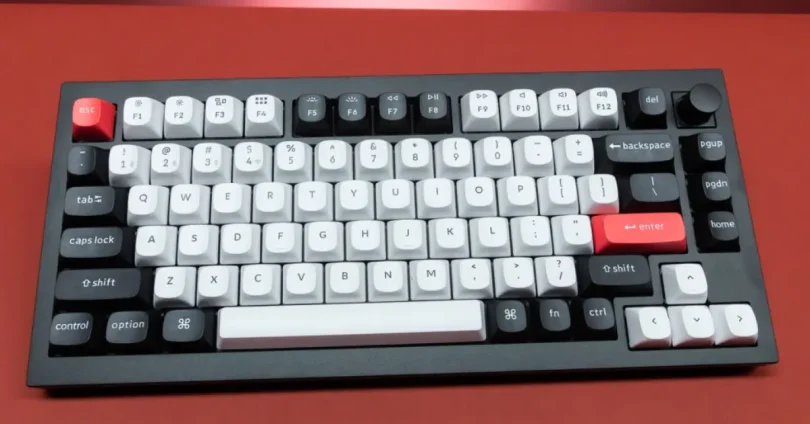
Wireless keyboards have surged in popularity in recent years, becoming a staple for everyone from casual users to competitive gamers and remote professionals. In 2025, with improvements in battery life, connectivity, and design, going wireless no longer means sacrificing performance or reliability.
The benefits are clear: a clutter-free desk, greater mobility, and multi-device support—all without being tethered to your PC, tablet, or phone. Whether you’re building a minimalist setup or working across multiple screens, wireless keyboards offer the freedom and flexibility modern users demand.
This guide will help you choose the right wireless keyboard based on your needs—be it for gaming, productivity, portability, or ergonomic comfort. We’ll cover key features, connection types, battery life, top models, and what to avoid, so you can make a confident, informed choice.
Why Choose a Wireless Keyboard in 2025?
Improved Technology: Low Latency, Long Battery Life, and Reliability
Wireless keyboards in 2025 are significantly more advanced than older models.
- Latency has dropped to near-zero levels, especially with Bluetooth 5.3 and proprietary low-latency technologies like Logitech’s Lightspeed or Razer’s HyperSpeed.
- Battery life now spans weeks—or even months—on a single charge, with many models offering USB-C fast charging or even solar charging options.
- Wireless connections are highly stable, even in environments with lots of interference, like busy offices or co-working spaces.
Clean Desk Setup and Portability
Wireless keyboards help maintain a clutter-free, minimalist workspace, which improves both aesthetics and functionality.
- Without tangled cables, your desk stays organized, and you get more room for other gear or peripherals.
- Wireless models are easier to move around, making them ideal for hot-desking, shifting between rooms, or pairing with tablets or laptops on the go.
Multi-Device Pairing and Platform Compatibility
Modern wireless keyboards often support switching between multiple devices with the press of a button.
- Multi-device pairing allows seamless toggling between your PC, tablet, smartphone, or even smart TV.
- Most wireless keyboards are compatible with major platforms, including Windows, macOS, iPadOS, Android, and Linux, making them highly versatile.
Use Cases: Office, Gaming, Travel, and Content Creation
- Office and Remote Work: Wireless keyboards with quiet keys and ergonomic layouts are excellent for extended typing sessions.
- Gaming: Low-latency wireless mechanical keyboards now offer performance comparable to wired models, providing flexibility without compromise.
- Travel: Compact wireless keyboards are great for students, digital nomads, and anyone needing productivity on the move.
- Content Creation: Clean, cable-free setups with customizable keys are especially useful for video editors, streamers, and designers.
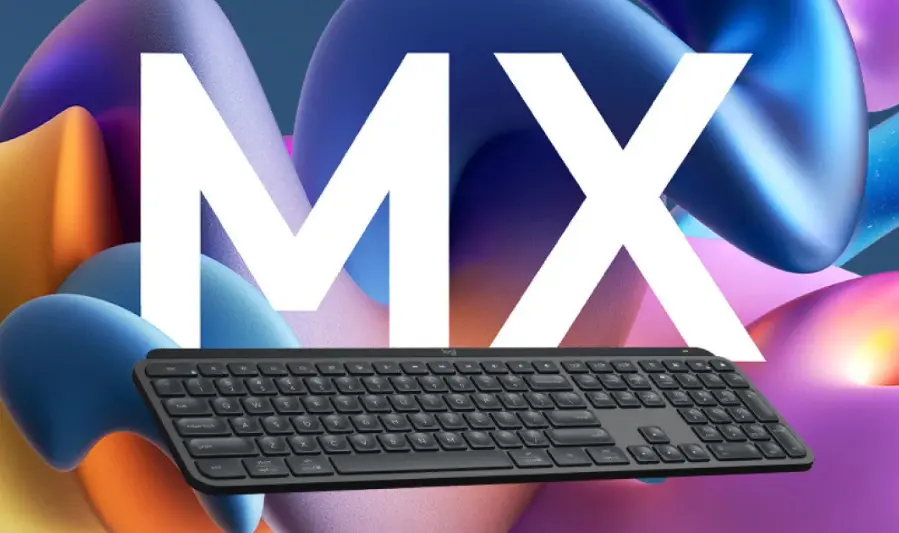
Logitech MX Keys S
- Brand: Logitech
- Key Features: Low-profile scissor switches, automatic backlighting, USB-C charging, multi-device pairing via Bluetooth or Logi Bolt receiver.
- Pros: Premium build, comfortable typing experience, long battery life, seamless device switching.
- Cons: No USB receiver storage, wrist rest sold separately, no cross-compatibility with Unifying Receiver.
- Best Suited For: Productivity, office work, content creation.
2. Keychron K3 Pro
- Brand: Keychron
- Key Features: Low-profile mechanical switches, hot-swappable keys, Bluetooth and wired connectivity, RGB backlighting.
- Pros: Compact design, customizable switches, versatile connectivity options.
- Cons: Reported reliability issues with certain keys, inconsistent build quality.
- Best Suited For: Developers, tech enthusiasts, compact workspace setups.
3. Razer BlackWidow V4 Pro Wireless
- Brand: Razer
- Key Features: Hot-swappable mechanical switches, 75% layout, wrist rest, customizable RGB lighting, USB-C charging.
- Pros: Premium build, tactile typing experience, low latency, extensive customization options.
- Cons: High power consumption leading to shorter battery life, no USB receiver storage.
- Best Suited For: Gamers seeking a compact yet feature-rich keyboard.
4. Apple Magic Keyboard with Touch ID
- Brand: Apple
- Key Features: Sleek design, scissor-switch keys, Touch ID integration, USB-C charging.
- Pros: Seamless macOS integration, long battery life, minimalist aesthetics.
- Cons: Limited customization options, no multi-device pairing.
- Best Suited For: Mac users prioritizing design and functionality.
5. Logitech K780
- Brand: Logitech
- Key Features: Full-size layout, integrated device stand, Bluetooth and USB receiver connectivity, multi-device pairing.
- Pros: Versatile design, comfortable typing experience, quiet keys.
- Cons: No backlighting, limited customization options, higher latency.
- Best Suited For: Office environments, users with multiple devices.
Comparison Table:
| Keyboard | Connectivity Options | Backlighting | Battery Life | Notable Features |
|---|---|---|---|---|
| Logitech MX Keys S | Bluetooth, Logi Bolt Receiver | Yes | Up to 5 months | Premium build, multi-device pairing |
| Keychron K3 Pro | Bluetooth, Wired | RGB | Moderate | Hot-swappable keys, compact design |
| Razer BlackWidow V4 Pro Wireless | Bluetooth, Wired | RGB | Short (unless power saving mode used) | Hot-swappable switches, wrist rest |
| Apple Magic Keyboard with Touch ID | Bluetooth, Wired | No | Long | Touch ID integration, sleek design |
| Logitech K780 | Bluetooth, USB Receiver | No | Long | Integrated device stand, multi-device pairing |
Conclusion:
- For Productivity: The Logitech MX Keys S offers a premium typing experience with seamless device switching.
- For Compact Setups: The Keychron K3 Pro provides a compact design without compromising on functionality.
- For Gaming: The Razer BlackWidow V4 Pro Wireless delivers a tactile typing experience with extensive customization options.
- For Mac Users: The Apple Magic Keyboard with Touch ID ensures seamless macOS integration with a minimalist design.
- For Multi-Device Use: The Logitech K780 caters to users with multiple devices, offering versatility and comfort.
you may also like to read these posts:
SSD vs HDD Performance Comparison: What You Need to Know
Fastest RAM in 2025: Best Memory Modules for Speed
Ultimate Guide to Cooling Systems for PCs: Choosing the Right Setup
Wireless Keyboard Buying Guide 2025: Best Models Reviewed
Types of Wireless Keyboards
Mechanical vs Membrane Keyboards
- Mechanical Keyboards use individual mechanical switches for each key, offering tactile feedback, durability, and customization options. They’re favored by gamers and typing enthusiasts for precision and responsiveness.
- Membrane Keyboards have a softer, quieter feel with rubber domes beneath the keys. They’re usually more affordable and quieter but less durable and less precise than mechanical keyboards. Ideal for casual or office use.
Full-Size vs TKL vs 60% Layout
- Full-Size Keyboards include all keys: alphanumeric, function row, navigation cluster, and numeric keypad. Great for productivity and tasks needing a numpad.
- Tenkeyless (TKL) keyboards remove the numeric keypad to save desk space while retaining most functionality. Popular among gamers and those with limited desk space.
- 60% Layout keyboards are ultra-compact, removing function keys, navigation cluster, and numpad. They prioritize portability and minimalism, but require using key combinations for some functions.
Bluetooth vs USB Receiver vs 2.4GHz Wireless
- Bluetooth Keyboards offer broad compatibility with PCs, laptops, tablets, and smartphones. They’re convenient for multi-device use but can have slightly higher latency and potential interference.
- USB Receiver (Proprietary 2.4GHz) keyboards come with a dedicated USB dongle for faster, more reliable connections with lower latency—preferred for gaming and high-performance use.
- 2.4GHz Wireless is the frequency most USB receivers and some Bluetooth devices operate on; proprietary 2.4GHz dongles usually offer better performance than standard Bluetooth.
Rechargeable vs Replaceable Batteries
- Rechargeable Keyboards come with built-in batteries that can be charged via USB-C, Lightning, or wireless charging pads. They’re eco-friendly and convenient but require periodic charging.
- Replaceable Battery Keyboards use AA or AAA batteries, allowing quick swaps without downtime. They’re useful for extended travel or when charging options are limited, but add the cost and hassle of buying batteries.
Key Features to Consider Before Buying a Wireless Keyboard
Battery Life and Charging Method
- Look for keyboards offering long battery life, ideally several weeks or months per charge or set of batteries.
- Consider the charging method—USB-C fast charging is now common and convenient, while some models offer wireless or solar charging.
- Replaceable batteries offer quick swaps but add ongoing cost and waste.
Typing Feel and Switch Type
- Decide between mechanical switches (tactile, clicky, or linear) and membrane/scissor switches (quiet and soft).
- If possible, try typing on the keyboard or look for reviews mentioning typing comfort and noise level.
- Switch type impacts typing speed, accuracy, and fatigue.
Backlighting and Customization
- Backlit keys improve usability in low-light environments. RGB lighting offers customization and aesthetics, especially popular with gamers.
- Some keyboards allow customizing key functions, macros, or lighting profiles via software.
Ergonomics and Build Quality
- Check for ergonomic features like wrist rests, adjustable tilt angles, or split designs to reduce strain during extended use.
- A sturdy build with quality materials (metal top plate, PBT keycaps) ensures durability.
- Compact designs improve portability but may sacrifice comfort or functionality.
OS Compatibility (Windows, Mac, Linux, Android, iOS)
- Ensure the keyboard supports your operating system(s) fully—some features (like special keys or shortcuts) may be OS-specific.
- Cross-platform compatibility is a must for multi-device users.
Number of Devices It Can Pair With
- Multi-device pairing enables switching between multiple devices (e.g., laptop, tablet, phone) easily, usually via dedicated keys.
- Check how many devices it supports and whether switching is seamless or requires reconnecting.
Best for Gaming
1. Razer Huntsman V3 Pro
- Features: Analog Optical Gen-2 switches with adjustable actuation (0.1–4.0mm), Rapid Trigger, Snap Tap, RGB lighting, onboard profiles, magnetic wrist rest.
- Why It Stands Out: Designed for competitive FPS players, offering fine-tuned sensitivity and rapid key response.
- Price: $249.99
2. Logitech G915 TKL LIGHTSPEED
- Features: LIGHTSPEED wireless technology, low-profile mechanical switches (GL Clicky, GL Tactile, GL Linear), RGB lighting, aluminum top plate.
- Why It Stands Out: Combines premium features in a compact form, ideal for minimalist setups.
- Price: Varies by retailer
3. Alienware Pro Wireless
- Features: Dual wireless connectivity (2.4GHz and Bluetooth), compact design, impressive battery life.
- Why It Stands Out: Designed for portability without sacrificing performance.
- Price: $199.99
Best for Typing/Productivity
1. Logitech MX Keys S
- Features: Low-profile scissor switches, automatic backlighting, USB-C charging, multi-device pairing via Bluetooth or Logi Bolt receiver.
- Why It Stands Out: Offers a premium typing experience with seamless device switching.
- Price: Varies by retailer
2. Keychron K3 Pro
- Features: Low-profile mechanical switches, hot-swappable keys, Bluetooth and wired connectivity, RGB backlighting.
- Why It Stands Out: Compact design with customizable switches, versatile connectivity options.
- Price: Varies by retailer
Best for Travel
1. Logitech MX Keys Mini
- Features: 75% layout, Bluetooth connectivity (up to 3 devices), white LED backlighting, Logi Options+ software.
- Why It Stands Out: Ultra-compact, lightweight, and comfortable to type on, making it ideal for on-the-go use.
- Price: $99.99
2. Keychron K3
- Features: Low-profile mechanical or optical switches, RGB backlighting, 75% layout, Bluetooth and wired connectivity.
- Why It Stands Out: Slim design with hot-swappable switches, suitable for travel.
- Price: Varies by retailer
Best for Mac Users
1. Apple Magic Keyboard with Touch ID
- Features: Sleek design, scissor-switch keys, Touch ID integration, USB-C charging.
- Why It Stands Out: Seamless macOS integration with a minimalist design.
- Price: Varies by retailer
2. Logitech MX Keys S
- Features: Low-profile scissor switches, automatic backlighting, USB-C charging, multi-device pairing via Bluetooth or Logi Bolt receiver.
- Why It Stands Out: Offers a premium typing experience with seamless device switching.
- Price: Varies by retailer
Best Budget Option
1. Keychron B1 Pro
- Features: Bluetooth and 2.4GHz wireless support, slim and quiet design, stylish appearance.
- Why It Stands Out: Offers nearly all the features of higher-end models at a fraction of the price.
- Price: $39.99
2. JamesDonkey J2 75%
- Features: QMK/VIA support for full key remapping, 2.4GHz wireless, Bluetooth, USB-C wired, gasket mount structure.
- Why It Stands Out: Advanced programmability and refined typing feel under $60.
- Price: $34–$59
Tips for Getting the Most Out of Your Wireless Keyboard
Maintaining Battery Health
- Charge regularly before the battery gets critically low to prolong battery lifespan.
- Avoid letting rechargeable batteries fully drain repeatedly.
- For replaceable batteries, use high-quality alkaline or rechargeable NiMH cells.
- If your keyboard supports auto-sleep, keep that enabled to save power during inactivity.
Firmware Updates and Software Configuration
- Check the manufacturer’s website or companion app regularly for firmware updates that improve performance, fix bugs, or add new features.
- Use the keyboard’s software to customize key mappings, macros, lighting, and device switching for a more personalized experience.
- Keep your device drivers updated, especially after OS upgrades.
Using Keyboard Shortcuts
- Learn OS-specific shortcuts to boost productivity (e.g., Alt+Tab for Windows, Cmd+Tab for macOS).
- Many wireless keyboards support multi-device switching shortcuts—get familiar with these to smoothly switch between devices.
- Use dedicated function keys or programmable macros for repetitive tasks.
Troubleshooting Connectivity Issues
- Ensure the keyboard is within the recommended range (usually 10 meters or about 30 feet).
- If lag or disconnects occur, try re-pairing the device or switching USB ports for the receiver.
- Reduce interference by moving away from other wireless devices or switching channels if your device supports it.
- Restart your computer or device to refresh Bluetooth or USB drivers.
Faqs:
Are wireless keyboards good for gaming in 2025?
Yes, many wireless keyboards now offer low-latency connections that rival wired keyboards, making them suitable for gaming.
How long do the batteries in wireless keyboards typically last?
Battery life varies by model, but most wireless keyboards last anywhere from a few weeks to several months on a single charge or set of batteries.
Can I connect a wireless keyboard to multiple devices at the same time?
Many modern wireless keyboards support multi-device pairing, allowing you to switch easily between up to three or more devices.
Is there noticeable input lag with wireless keyboards?
With advancements in Bluetooth and proprietary wireless tech, input lag is minimal and often unnoticeable for everyday use and even gaming.
Are mechanical wireless keyboards worth the extra cost?
Mechanical wireless keyboards provide better tactile feedback and durability, making them worth it for users who prioritize typing feel and longevity.
Conclusion:
Wireless keyboards in 2025 offer incredible convenience, versatility, and performance for a wide range of users—from gamers to professionals and casual typists. With advancements in technology, the latest models provide excellent battery life, low latency, and seamless multi-device connectivity. By considering your specific needs and preferences, you can find the perfect wireless keyboard that enhances your productivity and keeps your workspace clean and clutter-free.