
Introduction
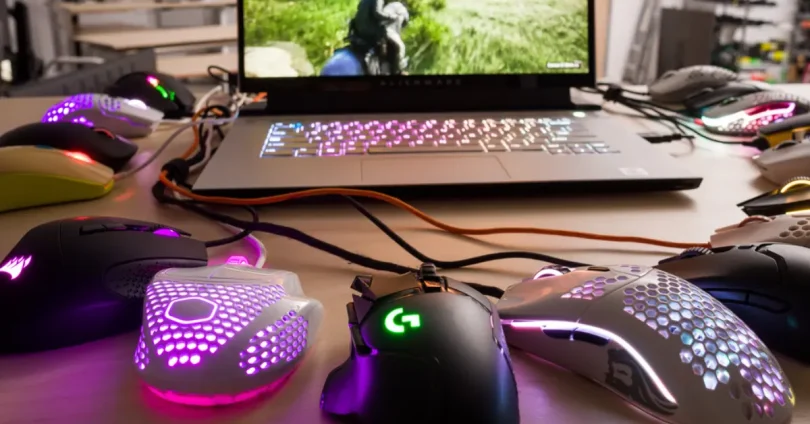
Choosing the right gaming mouse is crucial for both casual and competitive gamers, as it directly impacts precision, comfort, and overall gameplay experience. In 2025, gaming mice have evolved with cutting-edge technologies like ultra-fast sensors, customizable buttons, ergonomic designs, and advanced wireless connectivity that minimize latency. Understanding these features and how they align with your gaming style can help you gain a competitive edge and enhance long-term comfort during extended sessions. This guide will explore what makes a gaming mouse stand out in 2025 and how to pick the best one for your needs.
Why a Quality Gaming Mouse Matters
Impact on Gaming Performance and Accuracy
A high-quality gaming mouse offers precise tracking and fast, responsive sensor technology, enabling accurate aiming and swift movements—crucial for competitive gaming. Enhanced DPI settings and adjustable sensitivity allow players to tailor responsiveness to different game genres, improving overall performance.
Comfort and Ergonomics for Extended Play
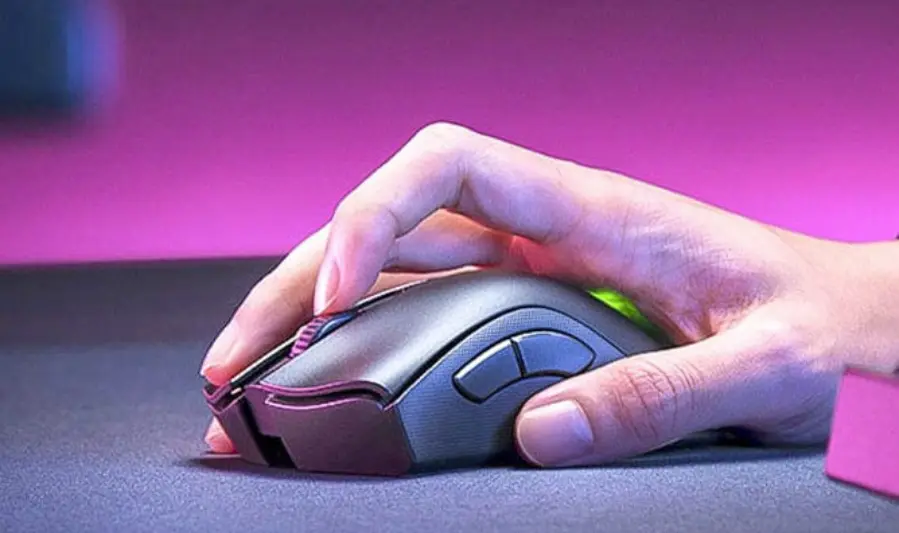
Gaming sessions can last hours, so a mouse designed with ergonomics reduces hand fatigue, wrist strain, and discomfort. Features like contoured shapes, textured grips, and customizable weights help maintain comfort and prevent injuries over long periods.
Customization and Programmable Features
Quality gaming mice come with programmable buttons and onboard memory, allowing gamers to assign macros, shortcuts, and in-game commands for faster execution. Customizable RGB lighting and profiles add personalization and make switching settings between games seamless.
Overview of the Top Gaming Mice in 2025
1. Razer Viper V3 Pro
- Key Features: Ultra-lightweight at 55g, Focus Pro 35K sensor, 8KHz polling rate, ambidextrous design.
- Strengths: Exceptional precision and speed, ideal for competitive FPS gamers.
- Best For: Esports professionals and gamers seeking top-tier performance.
- Price: Approximately $149.99 .
2. Logitech G Pro X Superlight 2
- Key Features: HERO 30K sensor, 60g weight, LIGHTSPEED wireless, 95-hour battery life.
- Strengths: Lightweight design with high accuracy, favored by esports professionals.
- Best For: Competitive gamers and those preferring a minimalist design.
- Price: Approximately $159.99 .
3. Razer DeathAdder V3 HyperSpeed
- Key Features: Focus Pro 30K sensor, 63g weight, ergonomic design, 95-hour battery life.
- Strengths: Comfortable shape with high performance, suitable for various gaming genres.
- Best For: All-purpose gaming, including FPS and MOBA.
- Price: Approximately $129.99 .
4. Logitech G502 X Plus
- Key Features: HERO 25K sensor, 13 programmable buttons, LIGHTFORCE hybrid switches, RGB lighting.
- Strengths: Versatile design with extensive customization options, suitable for both FPS and MMO games.
- Best For: Gamers needing multiple programmable buttons and customizable features.
- Price: Approximately $139.99 .
5. ASUS ROG Harpe Ace Mini
- Key Features: 42K DPI sensor, 49g weight, Bluetooth and 2.4GHz wireless, 130-hour battery life.
- Strengths: Ultra-lightweight and compact design, suitable for travel and esports.
- Best For: Gamers seeking a portable, high-performance mouse.
- Price: Approximately $129.99 .
These top gaming mice of 2025 offer a range of features catering to different gaming styles and preferences. Whether you’re a competitive esports player, a casual gamer, or someone who values portability, there’s a mouse tailored for your needs. Consider your specific requirements—such as weight, sensor accuracy, button customizatio
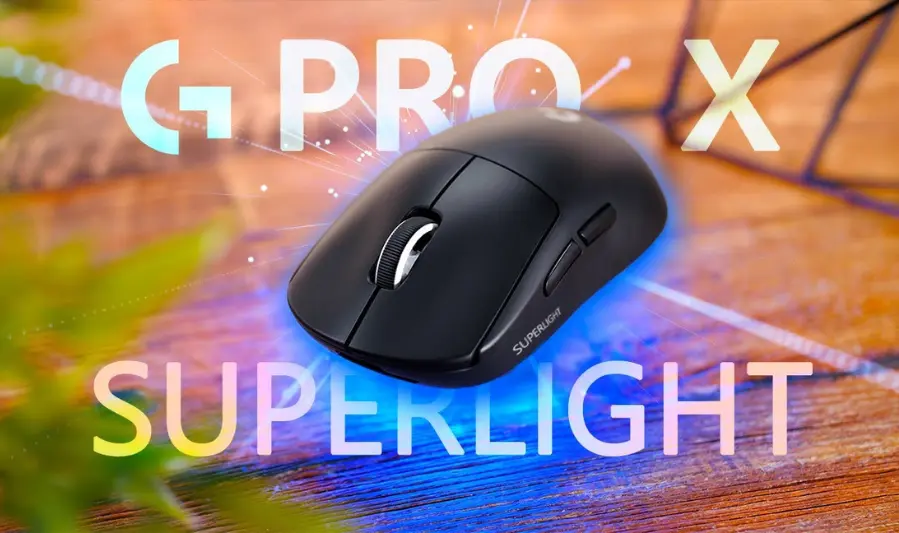
Logitech G Pro X Superlight
Features:
- Weight: 63g
- Sensor: Logitech HERO 25K (25,600 DPI)
- Buttons: 5 (left, right, scroll wheel, back, forward)
- Battery Life: Up to 70 hours
- Connectivity: Lightspeed wireless (no Bluetooth)
- Design: Minimalist, right-handed
Pros:
- Ultra-lightweight design enhances speed and reduces fatigue.
- High-precision HERO sensor ensures accurate tracking.
- Sleek and professional aesthetic.
- Reliable wireless performance with low latency.
Cons:
- Limited to 5 buttons; lacks additional programmable buttons.
- No RGB lighting.
- No Bluetooth connectivity.
- Compact size may not suit users with larger hands.
Ideal User: Competitive FPS gamers seeking a lightweight, high-performance mouse for quick reflexes.
you may also like to read these posts:
Fastest RAM in 2025: Best Memory Modules for Speed
Ultimate Guide to Cooling Systems for PCs: Choosing the Right Setup
Wireless Keyboard Buying Guide 2025: Best Models Reviewed
Ultimate Top Gaming Mouse Review: Performance, Features & Value
Razer DeathAdder V3 Pro
Features:
- Weight: 63g
- Sensor: Focus Pro 30K Optical Sensor
- Buttons: 6 programmable buttons
- Battery Life: Up to 90 hours
- Connectivity: HyperSpeed wireless, Bluetooth
- Design: Ergonomic right-handed
Pros:
- Lightweight and ergonomic design for comfort during extended sessions.
- Advanced sensor offers high precision and speed.
- Long battery life supports extended gaming sessions.
- Dual connectivity options (wireless and Bluetooth).
Cons:
- Higher price point compared to some competitors.
- Limited to 6 programmable buttons; may not suffice for MMO gamers.
Ideal User: Esports professionals and enthusiasts seeking a comfortable, high-performance mouse for FPS games.
SteelSeries Rival 5
Features:
- Weight: 85g
- Sensor: TrueMove Air Optical Sensor
- Buttons: 9 programmable buttons
- Connectivity: Wired
- Design: Ergonomic right-handed
Pros:
- Multiple programmable buttons cater to various gaming genres.
- Ergonomic design provides comfort during long sessions.
- High-precision sensor ensures accurate tracking.
Cons:
- Wired connectivity may limit movement.
- Heavier than some competitors, which may affect speed.
Ideal User: MOBA and MMO gamers requiring multiple programmable buttons for complex commands.
Corsair Dark Core RGB Pro SE
Features:
- Weight: 128g
- Sensor: 18,000 DPI optical sensor
- Buttons: 8 programmable buttons
- Connectivity: Wireless (Slipstream), wired, Bluetooth
- Design: Ergonomic right-handed with interchangeable side grips
Pros:
- Versatile connectivity options.
- Customizable side grips for personalized comfort.
- RGB lighting adds aesthetic appeal.
- High-precision sensor suitable for various gaming genres.
Cons:
- Heavier than some competitors, which may affect speed.
- Not ambidextrous; designed for right-handed users.
Ideal User: Gamers seeking a customizable and versatile mouse for various gaming genres.🖱️ Glorious Model O Wireless
Features:
- Weight: 69g
- Sensor: Pixart BAMF Optical Sensor
- Buttons: 6 programmable buttons
- Battery Life: Up to 71 hours (with RGB off)
- Connectivity: Wireless
- Design: Ambidextrous with honeycomb shell
Pros:
- Lightweight design enhances speed and reduces fatigue.
- High-precision sensor ensures accurate tracking.
- Long battery life supports extended gaming sessions.
- Customizable RGB lighting adds aesthetic appeal.
Cons:
- Honeycomb design may collect dust and be challenging to clean.
- Ambidextrous shape may not be as comfortable for all users.
- Battery life decreases significantly with RGB lighting enabled.
Ideal User: Gamers seeking a lightweight, high-performance mouse with customizable features for FPS games.
Comparison Table:
| Mouse Model | Weight | Sensor | Battery Life | Programmable Buttons | Connectivity | Design Type |
|---|---|---|---|---|---|---|
| Logitech G Pro X Superlight | 63g | HERO 25K | 70 hours | 5 | Wireless (Lightspeed) | Right-handed |
| Razer DeathAdder V3 Pro | 63g | Focus Pro 30K | 90 hours | 6 | Wireless, Bluetooth | Ergonomic Right |
| SteelSeries Rival 5 | 85g | TrueMove Air | N/A | 9 | Wired | Ergonomic Right |
Key Factors to Consider
1. Weight
- Lightweight Mice (50–70g): Ideal for fast-paced games like FPS, where quick reflexes are crucial.
- Midweight Mice (70–90g): Offer a balance between speed and control, suitable for a variety of game genres.
- Heavy Mice (90g+): Provide stability and precision, preferred by gamers who favor slower, deliberate movements.
Modern wireless mice have achieved remarkable weight reduction, challenging the notion that wireless options are necessarily heavier.
2. Sensor Type & DPI
- Optical Sensors: Provide precise tracking with no acceleration or smoothing, preferred for competitive gaming.
- Laser Sensors: Offer higher DPI ranges and work on more surfaces but may introduce slight acceleration.
- DPI (Dots Per Inch): Higher DPI allows for faster cursor movement, which can be crucial in certain gaming scenarios.
3. Button Count & Customization
- FPS Games: A mouse with 5–7 buttons is typically sufficient.
- MMO/MOBA Games: Look for mice with 9–12 programmable buttons to manage complex commands.
- Customization Software: Allows you to assign macros, adjust DPI settings, and configure RGB lighting.
4. Grip Style
- Palm Grip: Entire hand rests on the mouse; larger, ergonomic mice are recommended.
- Claw Grip: Fingers are arched, palm doesn’t touch the mouse; a medium-sized, contoured mouse works best.
- Fingertip Grip: Only fingertips contact the mouse; lightweight, compact mice are ideal.
Wired vs. Wireless
Wired Mice
- Pros:
- Zero latency and consistent performance.
- No need for charging.
- Generally lighter.
- Cons:
- Cable drag can affect movement.
- Limited mobility
Wireless Mice
- Pros:
- Freedom of movement without cables.
- Modern wireless technology offers latency comparable to wired mice.
- Cons:
- Requires charging or battery replacement.
- Potential for interference in crowded environments.
Ergonomics & Comfort
- Palm Grip: Opt for larger, ergonomic mice that support the entire hand.
- Claw Grip: Medium-sized, contoured mice provide better support.
- Fingertip Grip: Lightweight, compact mice offer maximum agility.
Additional Considerations
- Battery Life (Wireless Mice): Ensure the mouse offers sufficient battery life for extended gaming sessions.
- Surface Compatibility: Check if the sensor type is compatible with your mousepad surface.
- Build Quality: Durable materials ensure longevity, especially during intense gaming sessions.
Recommended Mice Based on Use Case
| Use Case | Recommended Mice |
|---|---|
| Competitive FPS | Logitech G Pro X Superlight, Razer Viper V3 Pro |
| MMO/MOBA | SteelSeries Rival 5, Corsair Dark Core RGB Pro SE |
| Versatile Gaming | Glorious Model O Wireless, Razer DeathAdder V3 Pro |
DPI (Dots Per Inch) and Sensitivity Settings
Definition: DPI measures how far the cursor moves on-screen relative to physical mouse movement. Higher DPI means faster cursor movement for the same hand motion.
- High DPI (e.g., 10,000–25,600): Ideal for fast-paced games requiring quick reflexes.
- Low DPI (e.g., 400–800): Preferred for precision tasks like sniping in FPS games.
Many gaming mice offer adjustable DPI settings, allowing users to switch between different sensitivity levels on the fly.
Polling Rate and Input Lag
Definition: The polling rate indicates how often the mouse reports its position to the computer, measured in Hz. A higher polling rate reduces input lag, leading to more responsive gameplay.
- Common Polling Rates:
- 125 Hz: 8 ms delay
- 500 Hz: 2 ms delay
- 1000 Hz: 1 ms delay
- 4000 Hz: 0.25 ms delay
- 8000 Hz: 0.125 ms delay
For competitive gaming, a higher polling rate is beneficial, but the difference becomes less noticeable beyond 1000 Hz
Programmable Buttons and Macros
Definition: Programmable buttons allow users to assign specific functions or commands, enhancing gameplay efficiency.
- Benefits:
- Execute complex commands with a single click.
- Assign in-game actions or system functions.
- Create macros for repetitive tasks.
Mice designed for MMOs or MOBAs often feature additional buttons for extensive customization.
RGB Lighting and Software Customization
Definition: RGB lighting adds aesthetic appeal, while software customization offers control over mouse settings.
- RGB Lighting:
- Customize colors and effects for a personalized look.
- Sync lighting with other peripherals for a cohesive setup.
- Software Customization:
- Adjust DPI settings and polling rates.
- Program buttons and create macros.
- Save profiles for different games or tasks.
Many gaming mice come with proprietary software, such as Razer Synapse or Logitech G Hub, to facilitate these customizations.
Cleaning and Upkeep
- Regular Cleaning:
Use a microfiber cloth slightly dampened with water or isopropyl alcohol to wipe down the mouse surface, buttons, and sides. Avoid harsh chemicals that could damage finishes or coatings. - Sensor Cleaning:
Clean the sensor window gently with a dry cotton swab or soft brush to remove dust and debris for accurate tracking. - Mouse Feet:
Check mouse feet (skates) regularly for dirt buildup or wear that can affect smooth gliding. Clean them gently with a cloth or replace if worn out. - Mousepad Maintenance:
Keep your mousepad clean as dirt can transfer to the mouse feet. Fabric mousepads can usually be hand-washed; hard surfaces wiped down.
Software Updates and Firmware
- Driver and Software Updates:
Regularly update your mouse’s software (e.g., Logitech G Hub, Razer Synapse) to access the latest features, fix bugs, and improve compatibility. - Firmware Updates:
Manufacturers sometimes release firmware updates that improve sensor performance or fix issues. Check periodically via the software or manufacturer’s site and follow instructions carefully. - Backup Profiles:
Save your custom profiles and macros externally if the software supports it, especially before updating firmware or software.
Replacing Mouse Feet and Cables
- Mouse Feet Replacement:
Over time, mouse feet wear down, causing less smooth movement. Many gaming mice have easily replaceable feet available from the manufacturer or third-party sellers.- Remove old feet carefully with a plastic pry tool or fingernail.
- Clean the surface before applying new feet for better adhesion.
- Cable Replacement:
Some mice feature detachable cables, which can be swapped if frayed or damaged.- Use manufacturer-approved replacement cables for compatibility.
- Avoid sharp bends and excessive twisting to prolong cable life.
- Cable Management:
Use cable clips or mouse bungees to reduce drag and prevent damage.
Faqs:
Are wireless gaming mice as responsive as wired ones?
Yes, modern wireless gaming mice use advanced technology to minimize latency, making them virtually as responsive as wired mice.
How important is DPI in a gaming mouse?
DPI affects cursor sensitivity and precision. Higher DPI settings are useful for fast movements, while lower DPI offers better accuracy for precision aiming.
Can using a gaming mouse improve my gaming skills?
While a gaming mouse won’t directly improve skills, its precision, customizable buttons, and comfort can enhance performance and reduce fatigue.
Which grip style is best for gaming mice?
Grip style depends on personal preference—palm grip suits larger mice, claw grip offers control for quick movements, and fingertip grip is great for lightweight mice.
How long do gaming mice typically last?
With proper care, gaming mice can last several years. Durability depends on build quality, usage, and maintenance.
Conclusion:
Choosing the right gaming mouse is crucial for enhancing your gameplay, comfort, and precision. The top gaming mice of 2025 offer a variety of features, from ultra-lightweight designs to advanced sensors and customizable buttons, catering to every type of gamer. By understanding your preferences and gaming style, you can find the perfect mouse that boosts your performance and keeps you comfortable during long sessions. Invest wisely, and level up your gaming experience with the best mouse that fits your needs.