
Introduction
When building or upgrading a gaming PC, the motherboard is often overlooked—but it’s one of the most critical components in your system. Choosing the right motherboard ensures stability, compatibility, and performance, and it plays a major role in how easy it will be to upgrade your PC in the future.
The motherboard serves as the central hub, connecting your CPU, GPU, RAM, storage, and every other component. It determines what processors you can use, what type and speed of memory is supported, and what expansion features (like PCIe 5.0, USB4, or M.2 slots) are available.
In this guide, we’ll break down:
- The different chipsets available for Intel and AMD platforms in 2025
- Key features to look for depending on your needs (e.g. gaming, productivity, budget)
- A comparison of top brands and what sets them apart
- Recommendations based on various use cases — from budget builds to high-end gaming rigs
Whether you’re a first-time builder or upgrading an older setup, this comparison will help you make an informed choice and avoid compatibility headaches down the line.
Key Factors to Consider When Choosing a Motherboard
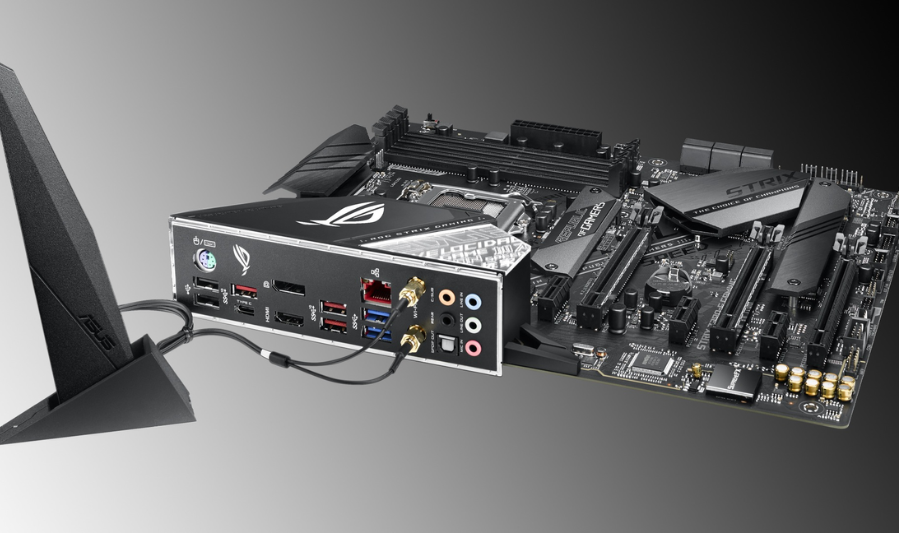
Let’s dive deeper into each of your points, enriched with reputable sources for added clarity and fresh context:
1. CPU Compatibility & Chipset
- Socket & Chipset: Ensure the motherboard’s CPU socket matches your processor—e.g., AM5 for AMD Ryzen 7000+, LGA 1700 for Intel 12th–14th Gen
- Chipset Features: High-end chipsets unlock advanced features like PCIe 5.0, overclocking, and expanded ports (e.g., Z790 for Intel, X570/B550 for AMD)
- Future-Proofing: AMD and Intel maintain some backward compatibility within socket generations; pick a chipset that supports future upgrades
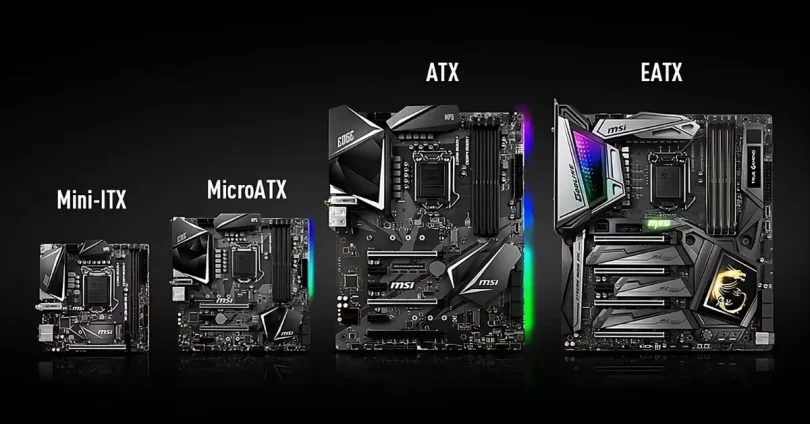
2. Form Factor (ATX / Micro‑ATX / Mini‑ITX)
- ATX: Full-size, maximum expandability and cooling—ideal for gaming or workstations
- Micro‑ATX: Compact yet moderately capable—fewer slots, good balance for mid-size builds
- Mini‑ITX: Best for SFF builds—space-efficient but limited in expandability and sometimes pricier
3. Memory Support
- Type & Capacity: Choose between DDR4 vs DDR5 depending on CPU and future needs. Check slot count, maximum capacity, and speed support
- Advanced RAM Features: Overclocking profiles (e.g., XMP), ECC support, and stability options may be relevant for power users
4. Expansion Slots & Storage
- PCIe Slots: Ensure availability of PCIe x16 for GPUs, plus x1 or x4 for additional cards. Pay attention to PCIe generations (4.0 vs 5.0) for future bandwidth
- M.2 & SATA: M.2 slots are critical for NVMe SSDs; SATA ports are useful for older drives
5. Connectivity Options
- USB & External Ports: Look for USB 3.2 Gen 2 / 2×2, USB-C, Thunderbolt, HDMI/DP depending on your use
- Networking: 2.5 GbE or higher Ethernet, and onboard Wi‑Fi 6/6E/7 + Bluetooth can simplify setups
6. Overclocking & BIOS Features
- Overclock-Friendly Boards: High-end boards (e.g., Intel Z-series, AMD X-series) along with strong VRMs and cooling make overclocking safer
- User-Friendly BIOS: Features like BIOS flashback, dual BIOS, intuitive UI, debug tools, and advanced control are immensely helpful
7. Build Quality & Thermal Design
- Hardware Durability: Look for quality components like Japanese capacitors, reinforced slots, robust VRMs, and extra PCB layers
- Cooling & Fan Control: Good VRM/chipset heatsinks and plenty of fan headers (with BIOS/firmware fan control) help maintain system thermal balance
8. Reliability, Support & Aesthetics
- Software & Support: Trustworthy manufacturers with frequent BIOS updates, solid support, and helpful utilities (fan control, firmware updates) ensure longevity
- Visual Appeal: RGB lighting or color themes may be important for builders focused on aesthetics
Summary Table
| Factor | What to Look For |
|---|---|
| CPU & Chipset | Socket match + feature-rich chipset (e.g., PCIe, overclocking) |
| Form Factor | ATX for max expandability, mATX for balance, Mini-ITX for compact |
| Memory | DDR4/DDR5, slot count, capacity, XMP/ECC support |
| Expansion & Storage | PCIe lanes (4.0/5.0), M.2 slots, SATA ports |
| Connectivity | USB types, Wi-Fi/Bluetooth, Ethernet speed |
| Overclocking Capability | Strong VRMs, BIOS features, thermal controls |
| Build Quality | High-quality components, heatsinks, fan headers |
| Support & Aesthetics | BIOS/software updates, warranty, RGB/design |
Pro Tip: BIOS Stability & Safety Concerns
Recently, AMD flagged issues with burned-out AM5 sockets tied to poor BIOS settings from some OEMs and overclocking errors . Always ensure BIOS is up-to-date and stable before using advanced features .
Final Tip
Start by defining your needs—whether it’s compact size, budget constraints, high performance, or overclock potential. Then align those with the above factors to narrow down your choices. Web searches like “best gaming motherboards 2025” can offer curated picks and real-world performance context
Best Motherboard for Gaming (Intel & AMD)
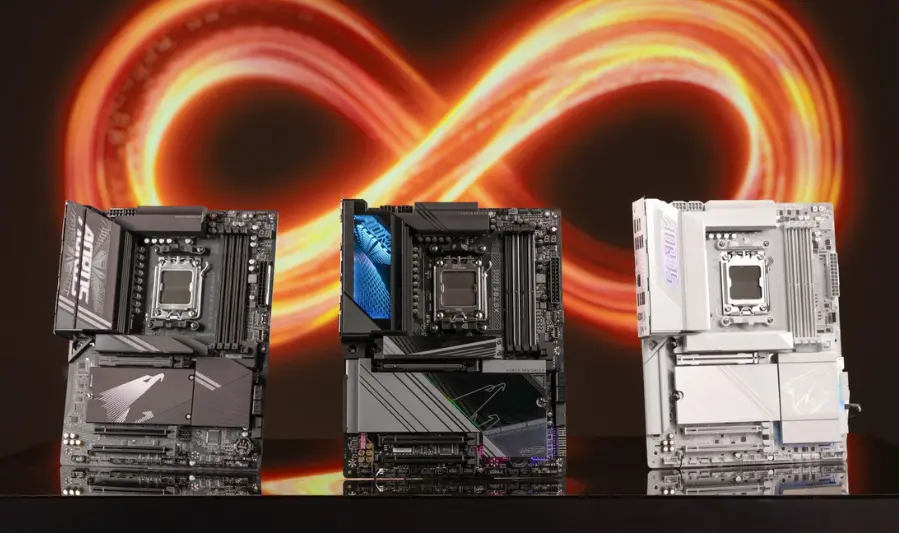
AMD (AM5 / AM5+)
- MSI MAG X870 Tomahawk WiFi — Rated “best overall” for AM5 gaming builds. Excellent value with PCIe 5.0, Wi‑Fi 7, strong VRMs, and rich connectivity for under $300.
- Asus ROG Crosshair X670E Hero — High-end enthusiast’s pick with robust VRMs, DDR5, PCIe 5.0, and solid overclocking support.
- MSI MPG X870E Carbon WiFi — Premium RGB-laden board with dual PCIe 5.0 slots, USB‑C 4.0, excellent thermal design—top choice for high-end AMD builds.
Intel (LGA 1700 / 1851)
- Asus ROG Maximus Z890 Hero — Leading choice for Core Ultra ‘S’ CPUs, with top-tier overclocking & connectivity.
- MSI MAG Z790 Tomahawk WiFi — Strong all-around pick for 13th/14th Gen CPUs—good VRMs, features & value.
- Asus ROG Strix Z790-E Gaming WiFi — Great balance of PCIe 5.0, DDR5, Thunderbolt support, and overclocking, ideal for enthusiasts.
you may also like to read these posts:
Powerful & Compact: Best Portable Mini PCs for Work
The Most Powerful Graphics Cards of 2025 Reviewed
Top Powerful Processors for Ultimate Gaming Performance 2025
Best Motherboards in 2025: A Complete Comparison Guide
3.2 Best Budget Motherboard
- ASUS TUF Gaming B650‑Plus WiFi (AM5) — Reliable B650 board with DDR5, PCIe 5.0 readiness, durable build, Wi-Fi 6 and 2.5 Gb LAN at a solid price.
- Gigabyte B650M AORUS Elite AX (AM5) — Budget yet feature-rich: DDR5, PCIe 5.0, 2.5 Gb LAN, solid VRMs under typical budgets.
- ASRock B550M-HDV (AM4) — Affordable micro‑ATX board for Ryzen 3000/5000; basic but effective for tight budgets.
3.3 Best Motherboard for Content Creation / Workstations
While specific workstation boards weren’t directly listed in our sources, these motherboards stand out for creators:
- Gigabyte X670 Aorus Elite AX (AM5) — Great feature set for expansion: PCIe 5.0, DDR5, robust power and thermal design for heavy-duty workloads.
- GIGABYTE X870 Aorus Elite WiFi 7 — Future‑proof powerhouse supporting DDR5‑8000+, full PCIe Gen 5 for GPU/SSD, and USB4. Solid foundation for creators.
- Gigabyte X870E Aorus Pro ICE (AM5) — PCIe 5.0, DDR5, 10GbE + 2.5GbE LAN, strong VRMs and cooling—ideal for demanding creation workflows.
3.4 Best Mini‑ITX Motherboard for Compact Builds
From PC Gamer’s recent testing (2025):
- Asus ROG Strix X870-I Gaming WiFi (AM5) — Top-tier Mini‑ITX for AM5: Wi‑Fi 7, PCIe 5.0, USB4, Gen 5 SSD support—highly future‑proof.
- Gigabyte A620I AX — Budget AM5 Mini‑ITX with Wi‑Fi 6E and Ryzen 8000G APU support.
- ASRock Phantom Gaming B850I Lightning WiFi (AM5) — Mid‑range ITX with plenty of USB, good cooler clearance, though lacks some top-tier features.
Intel Builds:
- ASRock Phantom Gaming B860I Lightning WiFi (LGA 1851) – Thunderbolt 4, dual M.2 slots.
- ASUS ROG Strix Z790-I Gaming WiFi (LGA 1700) – Strong USB and overclocking support.
Additional Recommendations from Video (via BC Zone):
- AMD: GIGABYTE B650I AORUS Ultra — Top choice
- Intel: ASRock Phantom Gaming Z790I Lighting — Top choice
(; combined with premium and budget picks)
3.5 Best Future‑Proof Motherboard
- GIGABYTE X870 Aorus Elite WiFi 7 (AM5) — Designed for next-gen with DDR5‑8000+, full PCIe Gen 5 for both GPU and SSD, USB4, and Wi‑Fi 7. Excellent long-term value.
- Gigabyte X870E Aorus Pro ICE — Robust VRMs, PCIe 5.0, dual 10GbE/2.5GbE LAN, Wi‑Fi 6E—geared for future performance.
- MSI MPG X870E Carbon WiFi — Loaded with next-gen ports (USB‑C 4.0), dual PCIe 5.0, Wi‑Fi 7—rich and future‑ready.
Table Summary
| Category | Recommended Motherboards |
|---|---|
| Gaming (AMD) | MSI MAG X870 Tomahawk WiFi, Asus ROG Crosshair X670E Hero, MSI MPG X870E Carbon WiFi |
| Gaming (Intel) | Asus ROG Maximus Z890 Hero, MSI MAG Z790 Tomahawk WiFi, Asus ROG Strix Z790‑E Gaming WiFi |
| Budget | ASUS TUF Gaming B650‑Plus WiFi (AM5), Gigabyte B650M AORUS Elite AX (AM5), ASRock B550M-HDV (AM4) |
| Content Creation / Workstation | Gigabyte X670 Aorus Elite AX, GIGABYTE X870 Aorus Elite WiFi 7, Gigabyte X870E Aorus Pro ICE |
| Mini‑ITX (AMD) | Asus ROG Strix X870-I Gaming WiFi, Gigabyte A620I AX, ASRock Phantom Gaming B850I Lightning WiFi |
| Mini‑ITX (Intel) | ASRock Phantom Gaming B860I Lightning WiFi, ASUS ROG Strix Z790-I Gaming WiFi |
| Future‑Proof | GIGABYTE X870 Aorus Elite WiFi 7, Gigabyte X870E Aorus Pro ICE, MSI MPG X870E Carbon WiFi |
Brand Overview: What to Expect in 2025
1. ASUS
Strengths:
- The global market leader in 2025, with ~35% share, powered by strong R&D, thermal design, and feature-rich innovation in boards like ROG Maximus and TUF Gaming
- Renowned series: ROG (premium gaming/overclocking), TUF (durable builds), ProArt & Prime (content creation, professional use)
- Continues to deliver bleeding-edge tech: automatic overclocking, advanced VRMs, multi-layer PCBs—great for high-performance and creative workloads
Weaknesses:
- Heavy reliance on the PC market can be risky as mobile devices surge
- Perceived as budget-oriented by some, which may limit premium brand appeal
- Criticisms include supply chain dependencies, inconsistent support, and RMA challenges
- Some community skepticism: “Anyone but Asus… their RMA issues and support are widely criticized.”
2. MSI
Strengths:
- Rapidly rising with a ~28% market share in 2025, touted for blending value and innovation—especially among gamers
- Projected to ship over 10 million motherboards, matching Gigabyte—a testament to its sheer volume and popularity
- Known for solid designs and fan-favorite series like MAG and MPG.
- Fresh launch: limited-edition MEG X870E Godlike X Edition with luxe finishes and high-end features—evidence of brand prestige and attention to aesthetic
Weaknesses:
- Generally positive, but some users have noted inconsistent software or BIOS quirks
- However, MSI is often praised for good after-sale support
3. Gigabyte
Strengths:
- A reliable stalwart (~20% market share) known for high quality, compatibility, and long-term stability
- Notable innovations include Ultra Durable motherboards, robust VRMs, and strong thermal engineering
- Popular AORUS series—feature-rich and gamer-focused.
- Offers solid warranties (typically 3 years) across many regions
Weaknesses:
- A reported firmware backdoor issue in 2023 raised security concerns for some users
- Some users cite flaky BIOS/software and less satisfying support experiences
4. ASRock
Strengths:
- Focused on high value and strong performance at competitive prices
- Popular series: Taichi (premium), Phantom Gaming, Steel Legend (durable mid-range), and Pro for budget builds.
- The X870E Taichi offers near-flagship features (USB4, Wi-Fi 7, PCIe 5.0) at lower cost than competitors
- Community praise for affordability and quality: “ASRock is literally the only brand worth considering… amazing value even at high-end.”
- Many users cite ASRock as the most reliable overall in terms of value and support
Weaknesses:
- Market availability may be limited in some regions, affecting accessibility
5. Biostar
Strengths:
- Excellent budget options with dependable build quality and durability
- Offers good feature sets for price: power delivery, BIOS control, multiple ports—even with limited cost
- Community feedback varies, but many appreciate the cost-to-performance ratio: “My motherboard for my first build was a Biostar… worked great.”
“Reliable and good brand.”
Weaknesses:
- Not recommended for overclocking due to weaker VRMs in some models
- Issues include slower BIOS updates, weaker customer support, and limited brand recognition—especially outside Asia
Summary Table
| Brand | 2025 Market Position | Strengths | Weaknesses |
|---|---|---|---|
| ASUS | Market leader (~35%) | Cutting-edge features, strong VRMs, wide product range | Supply chain reliance, inconsistent support, perceived as budget |
| MSI | Rising fast (~28%) | Great value, aesthetic appeal, strong design, high shipment volume | Some BIOS/software quirks |
| Gigabyte | Stable (~20%) | Durable builds, broad compatibility, good warranty | Security concerns, mixed software support |
| ASRock | Value king | Strong specs for price, innovative, highly praised by users | Limited regional availability |
| Biostar | Niche budget segment | Affordable, reliable for basic use | Lacks overclock potential, weaker support, lower brand awareness |
Keen to go deeper?
Want help selecting based on your CPU (e.g., Ryzen 9 7950X, Core Ultra 200S), build goals (gaming, content creation, budget, etc.), or specific feature priorities? Happy to tailor recommendations to exactly what matters most to you.
Socket Types: LGA 1700 vs. AM5
Intel LGA 1700
- Introduced: November 2021 with Alder Lake CPUs.
- Compatibility: Supports 12th, 13th, and 14th Gen Intel Core processors.
- Memory Support: Offers DDR4 and DDR5 compatibility, depending on the motherboard.
- PCIe Support: PCIe 5.0 support is available on select Z790 motherboards.
- Socket Lifespan: Intel typically changes sockets every 2–3 generations; LGA 1700 is expected to be succeeded by LGA 1851 with the 15th Gen CPUs .
AMD AM5
- Introduced: September 2022 with Ryzen 7000 series CPUs.
- Compatibility: Supports Ryzen 7000, 8000, and 9000 series processors.
- Memory Support: Exclusively supports DDR5 memory.
- PCIe Support: PCIe 5.0 support is standard across X670E, X670, and B650E chipsets.
- Socket Lifespan: AMD has committed to supporting the AM5 socket through at least 2027, offering a longer upgrade path .
Chipset Hierarchy: Z790 vs. X670
Intel Z790
- Target Audience: Enthusiasts and gamers.
- Overclocking: Full CPU and memory overclocking support.
- PCIe Lanes: Supports up to 20 PCIe 4.0 lanes; PCIe 5.0 lanes are limited.
- USB Ports: Up to 10 USB 3.2 Gen 2 ports.
- Networking: Integrated Wi-Fi 6E and Bluetooth 5.3 support.
- SATA Ports: Up to 8 SATA 3.0 ports.
- Platform Longevity: Limited, as Intel transitions to LGA 1851 with the 15th Gen CPUs.
AMD X670
- Target Audience: High-end enthusiasts and content creators.
- Overclocking: Supports CPU and memory overclocking.
- PCIe Lanes: Offers up to 24 PCIe 4.0 lanes; PCIe 5.0 lanes are available on select models.
- USB Ports: Up to 14 USB 3.2 Gen 2 ports.
- Networking: Integrated Wi-Fi 6E support.
- SATA Ports: Up to 8 SATA 3.0 ports.
- Platform Longevity: AMD’s commitment to the AM5 socket ensures a longer upgrade path .
Platform Longevity & Upgrade Paths
- Intel: Frequent socket changes (every 2–3 generations) can limit upgrade options. LGA 1700 is expected to be succeeded by LGA 1851 with the 15th Gen CPUs, potentially requiring a new motherboard for future upgrades .
- AMD: The AM5 socket is expected to support multiple generations of Ryzen processors, with AMD committing to support it through at least 2027. This offers users a more extended upgrade path without needing to change the motherboard .
Conclusion
- Choose Intel if you prioritize:
- Single-threaded performance and overclocking capabilities.
- Immediate availability of DDR4 support.
- Compatibility with existing LGA 1700 coolers.
- Choose AMD if you prioritize:
- Long-term platform support and future upgradeability.
- Exclusive DDR5 support for better future-proofing.
- PCIe 5.0 support across a broader range of chipsets.
Both platforms offer compelling features, so your choice should align with your specific needs and future upgrade plans.
Common Mistakes to Avoid When Buying a Motherboard
- Ignoring Compatibility with CPU or Case
- Not checking if the motherboard socket matches your CPU (e.g., LGA 1700 for Intel, AM5 for AMD).
- Overlooking the motherboard’s form factor compatibility with your PC case (ATX, Micro-ATX, Mini-ITX).
- Overpaying for Features You Won’t Use
- Buying a high-end board with advanced overclocking or multiple PCIe 5.0 slots when you don’t need them.
- Getting excessive RGB or premium audio features if your build doesn’t require it.
- Choosing the Wrong Form Factor
- Picking a Mini-ITX motherboard for a large case or vice versa, leading to wasted space or fitting issues.
- Not considering the number of expansion slots you’ll actually need.
- Skipping BIOS Update Needs for New CPUs
- Buying a motherboard that doesn’t have the latest BIOS required for your CPU out of the box.
- Not checking if you need a BIOS flash before installing a new-generation CPU, which can be tricky without an older compatible CPU.
Faqs:
Do I need a high-end motherboard for gaming?
Not always. While high-end motherboards offer better features like advanced cooling and more expansion slots, mid-range boards often provide excellent gaming performance at a lower cost.
Is DDR5 support worth it in 2025?
DDR5 is becoming more mainstream and offers faster speeds and better power efficiency, but DDR4 motherboards are still capable and often more affordable. Choose based on your budget and upgrade plans.
Can I upgrade my CPU without changing the motherboard?
It depends on the motherboard’s socket and chipset compatibility. Some motherboards support multiple CPU generations, but major upgrades often require a new motherboard.
What’s the best motherboard chipset for overclocking?
For Intel CPUs, Z-series chipsets like Z790 are best for overclocking. For AMD, X670 or B650 motherboards support overclocking with Ryzen processors.
Are budget motherboards reliable for long-term use?
Yes, many budget motherboards from reputable brands offer good reliability and essential features. However, they may lack advanced features or robust power delivery found in premium boards.
Conclusion:
Choosing the right motherboard is essential for building a reliable and high-performance PC. Whether you’re a gamer, content creator, or casual user, understanding the differences between chipsets, form factors, and features will help you make the best choice. From budget-friendly options to high-end boards packed with features, there’s a motherboard for every need and budget in 2025. Always consider compatibility, upgrade paths, and your specific use case before making a purchase to ensure your system runs smoothly and efficiently.